Exness demo account - full review and step-by-step instructions for beginners
How to learn for beginners?
Today we will discuss an invaluable educational tool that allows every beginner to try their hand at the financial markets: a demo account. What is it and how to use it correctly?
Lossless learning - Trial accounts allow you to simulate trading tactics using demo capital instead of real capital. This removes the fear of making mistakes and allows you to focus on learning.
Gain invaluable experience - Practical work on the trading platforms helps to acquire analytical experience and make the trading process intuitive. Gain experience!
Increase Confidence - Trading in simulated market conditions allows you to gain experience and feel more confident before switching to a real account.
Demo or trial accounts reflect all aspects of real trading except the impact on real capital. Trial accounts assist traders at all levels in becoming proficient in analytics, understanding trading psychology, and navigating trading platforms prior to engaging in transactions with actual funds.
How to Open Demo Account?
Opening a demo account is quick and easy through their website (Webterminal), desktop platforms, or mobile app.
Webterminal
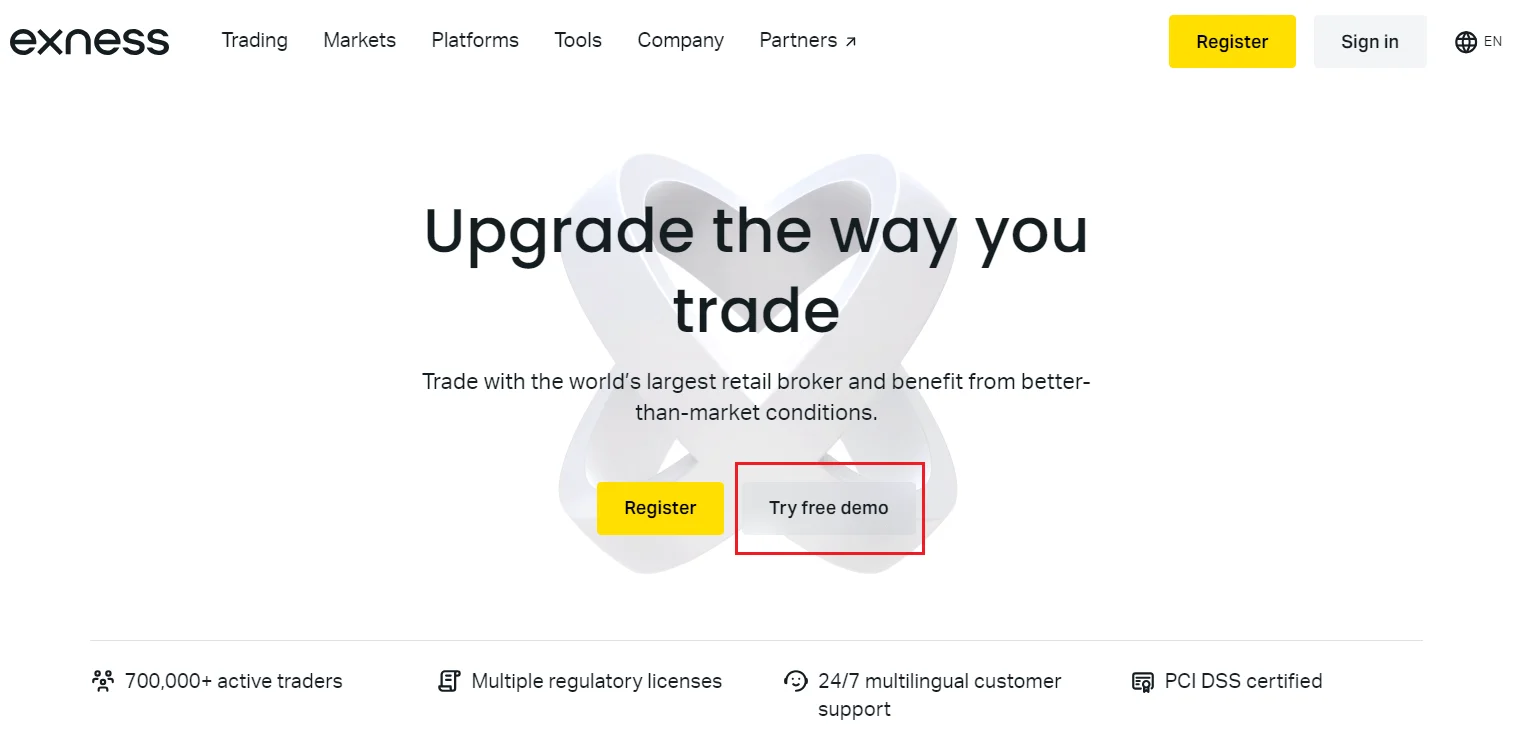
Registering directly on Exness official website takes just a few minutes:
- 1 - Visit website: visit the official website by clicking the link below.
- 2 - Sign up Demo: click the central button “Try the free demo”.
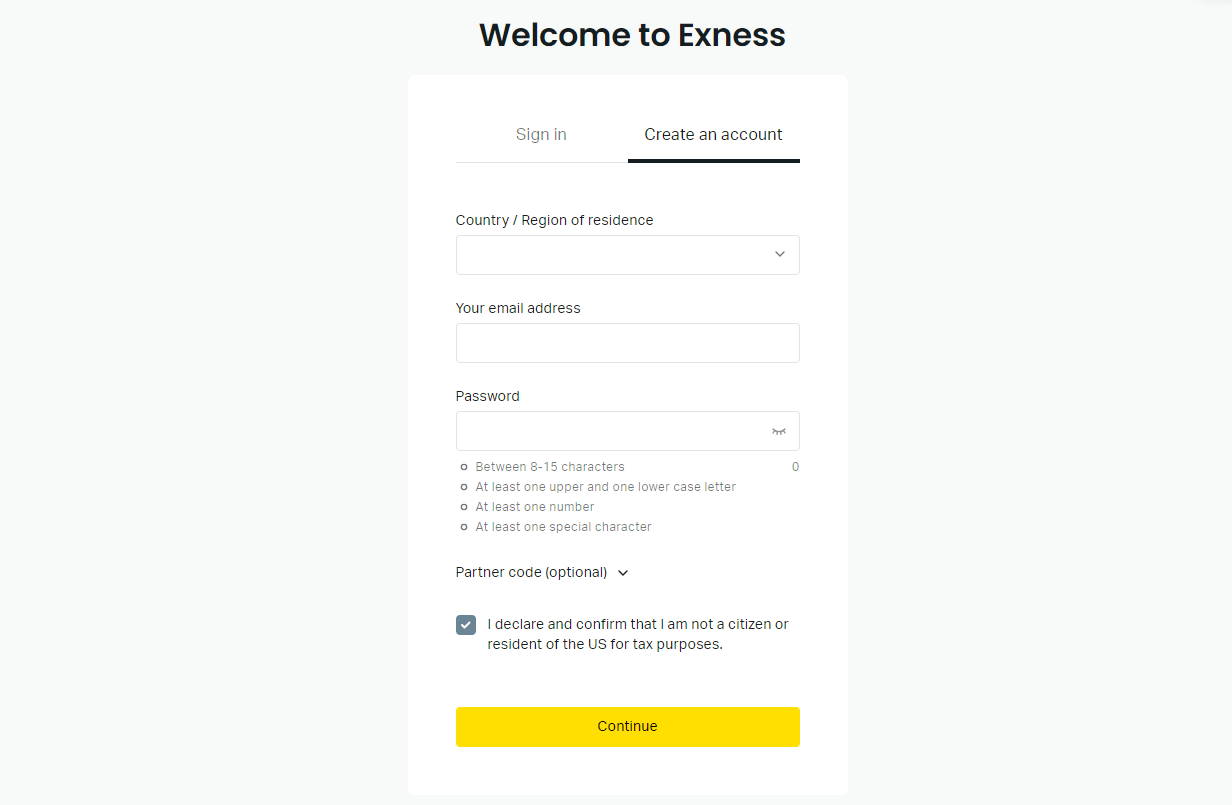
- 3 - Input your details: and click continue
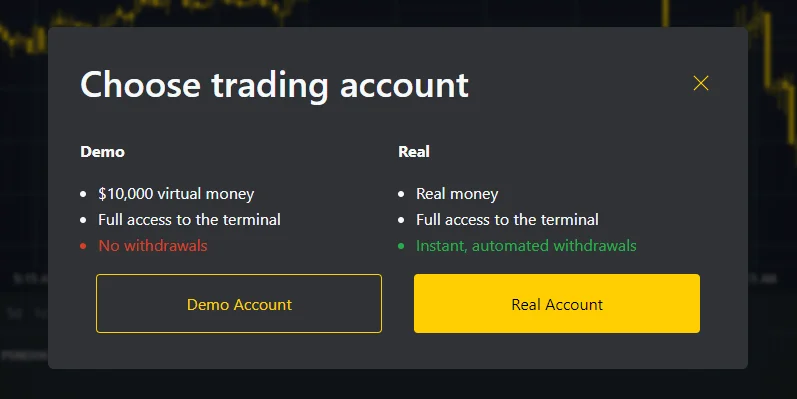
- 4 - Click “Demo": start trading on the trial account in web terminal.
When you open an account it provide you with a starting virtual balance of $10,000 for Exness web terminal or $500 for MT4 and MT5 demo accounts. At the same time, you can independently replenish your balance with the amount you need!
Demo Account in Mobile App
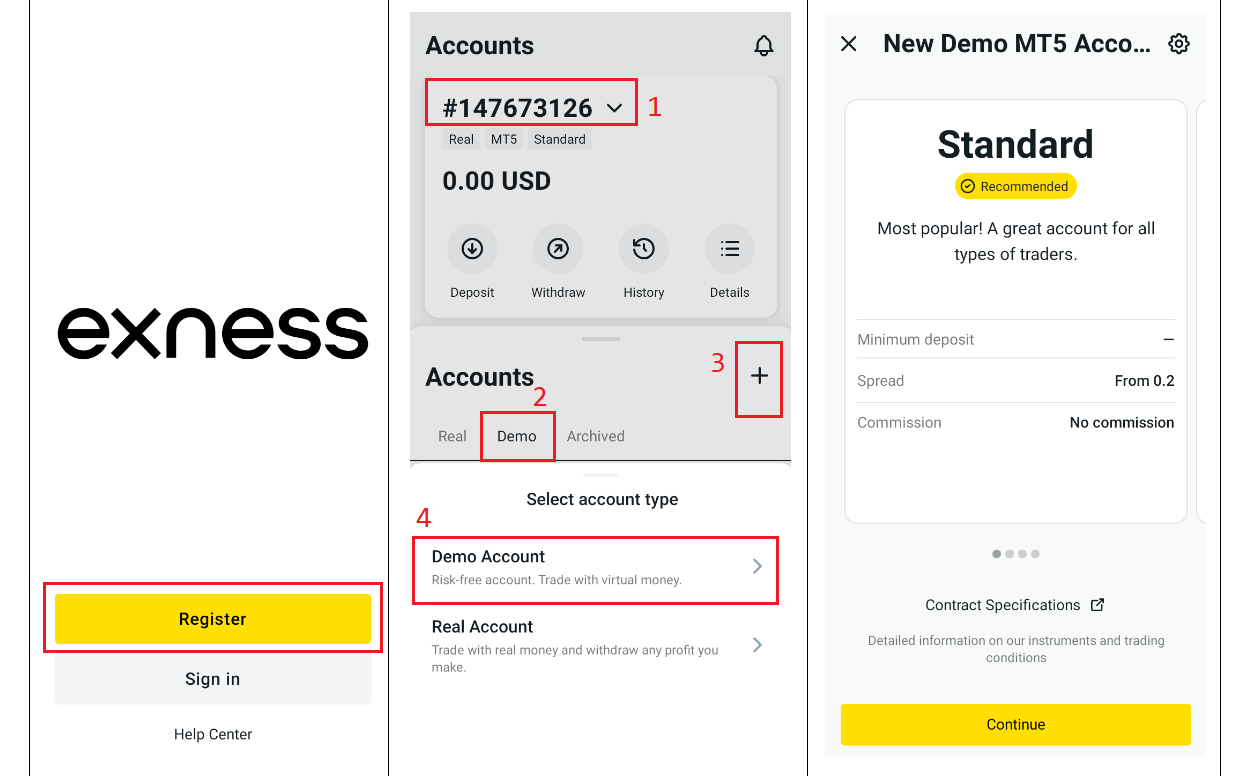
Demo account Exness can also be created directly in the mobile app:
- 1 - Find the Exness App: It is available on the official website for both iOS and Android devices.
- 2 - Start registering for the app: Click the register button and input your details.
- 3 - Select an account type: Go to the "Accounts" menu, then to the "Demo account" section and select "Open a new account."
- 4 - Complete registration: Follow the application instructions and click the finish button. You will then be able to allocate your preferred funding amount to your account.
How to login demo account?
Once registered, accessing demo accounts is straightforward:
Webterminal
Gain invaluable experience of trading in real market conditions without risk by logging account of the Exness web terminal:
- Go to the broker Exness home page using the link provided.
- Select the option "Try free demo" - "Sign in"
- Enter the required credentials: login and password.
- Open “My accounts” and click "Trade" - "Exness terminal" button to go to trading and you will be taken directly to the web terminal.
MT4 or MT5 for PC
Discover the next generation of trading with a MetaTrader Demo Account for PC.
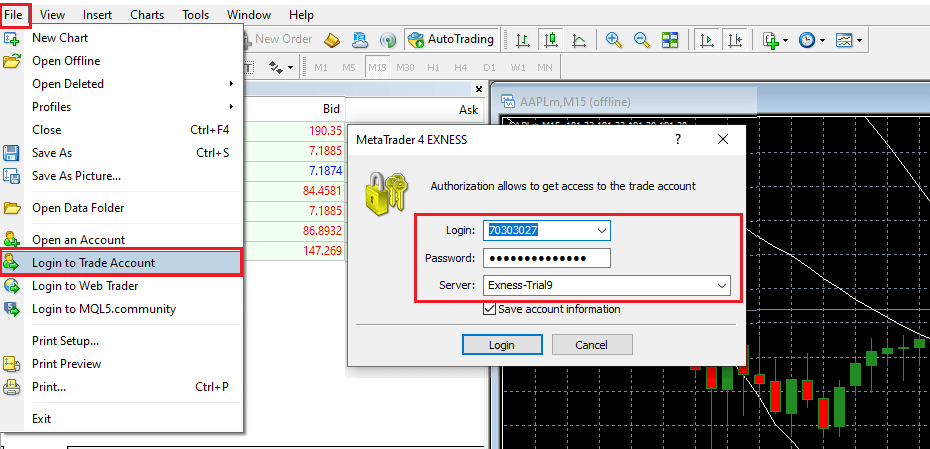
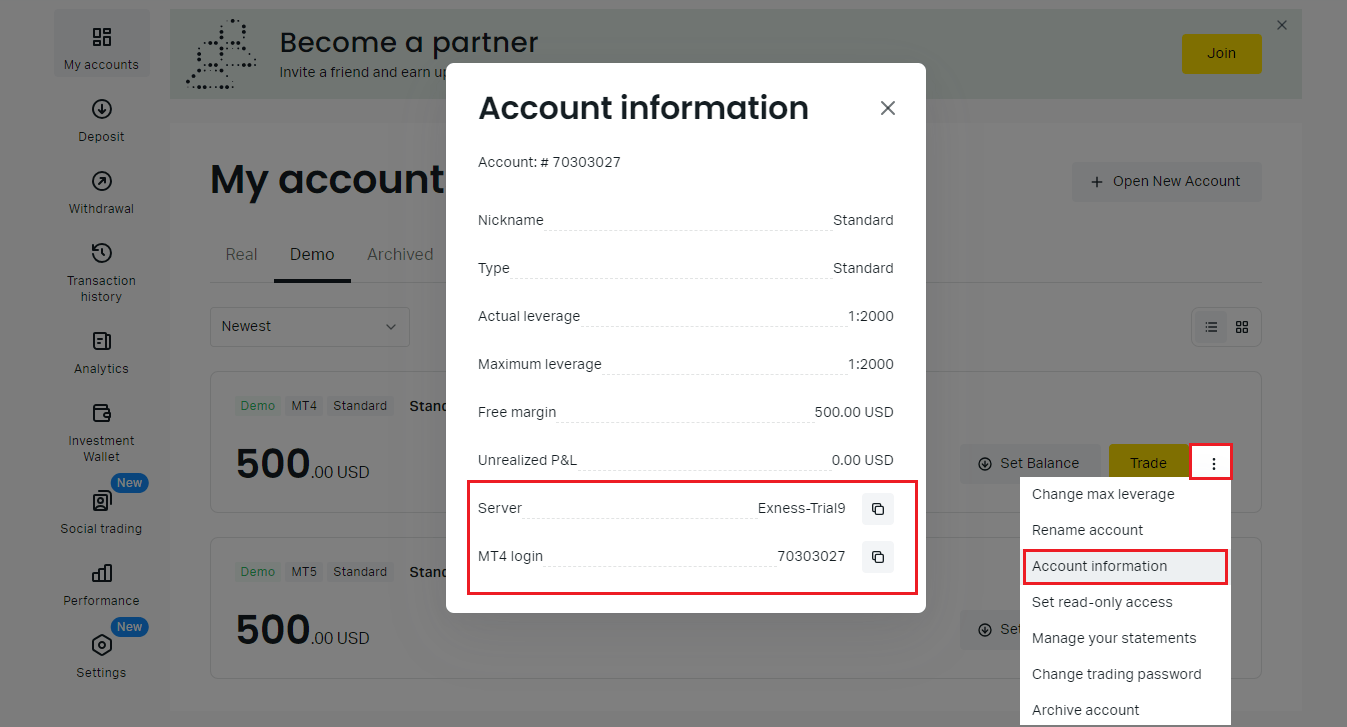
Find server and login information in your personal area on the Exness website by selecting the account you are interested in and the “account information” section.
- Start by launching the MT4 or MT5 application.
- Go to the "File" menu in the main interface and select "Login to Trade Account".
- Enter your Exness MT5 or demo mt4 account details (server, login and password)
- Confirm by clicking "OK" to access your demo trading environment.
Find server and login information in your personal area on the Exness website by selecting the account you are interested in and the “account information” section.
MT4 or MT5 mobile apps
To access your trial account via the MT4 or MT5 mobile apps, follow the simple login process:
- Open the MT4 or MT5 app on your smartphone.
- Go to "Settings" and select "New account" - "connect/use existing account"
- You will find the “Open a demo account” option in the proposed options.
- Fill in the required information for your account in MT4 or MT5 and confirm your login.
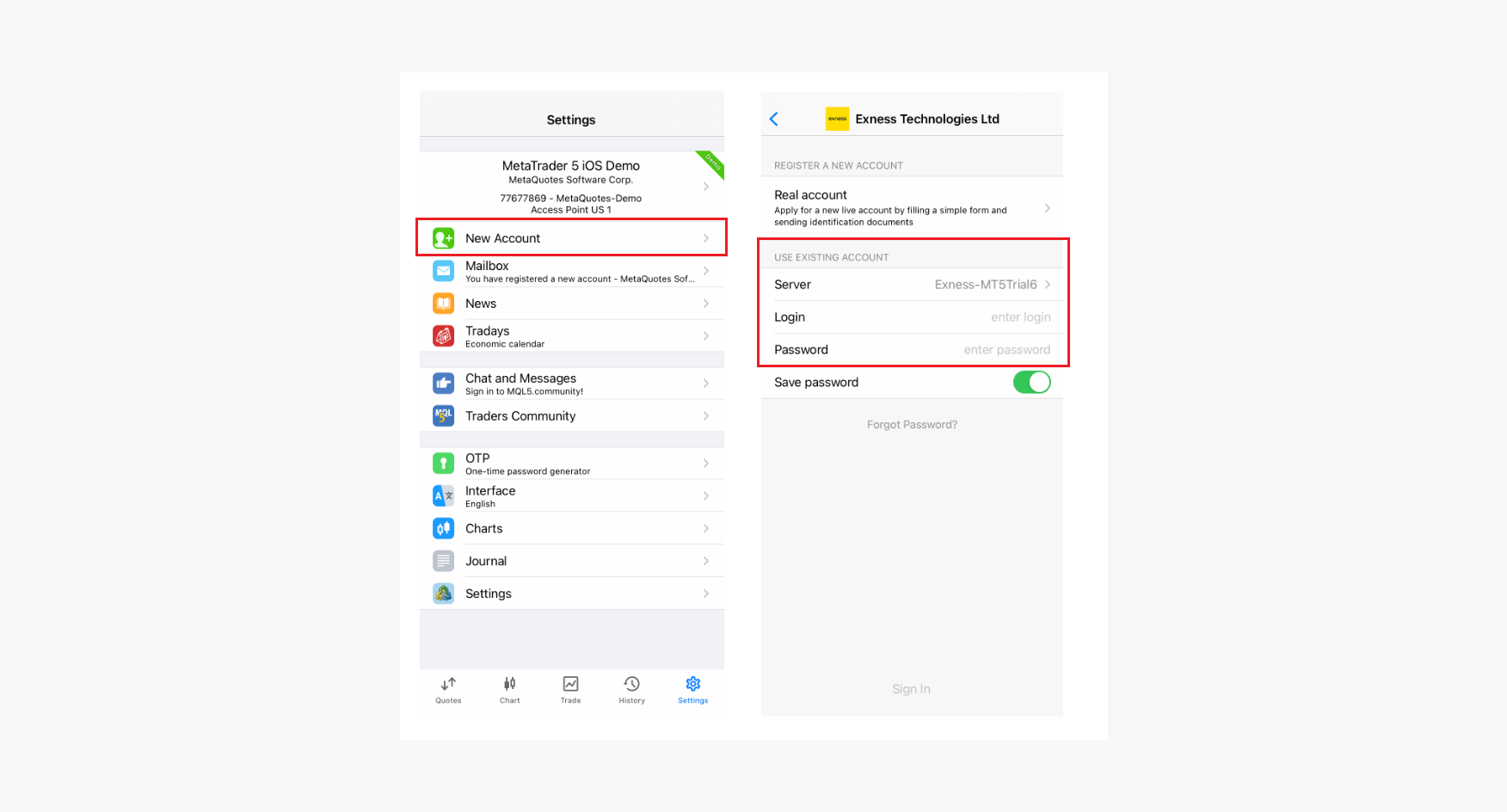
You can see information about the server and login information in your personal account on the Exness official site by selecting the account you are interested in and the “account information” section.
Exness mobile app
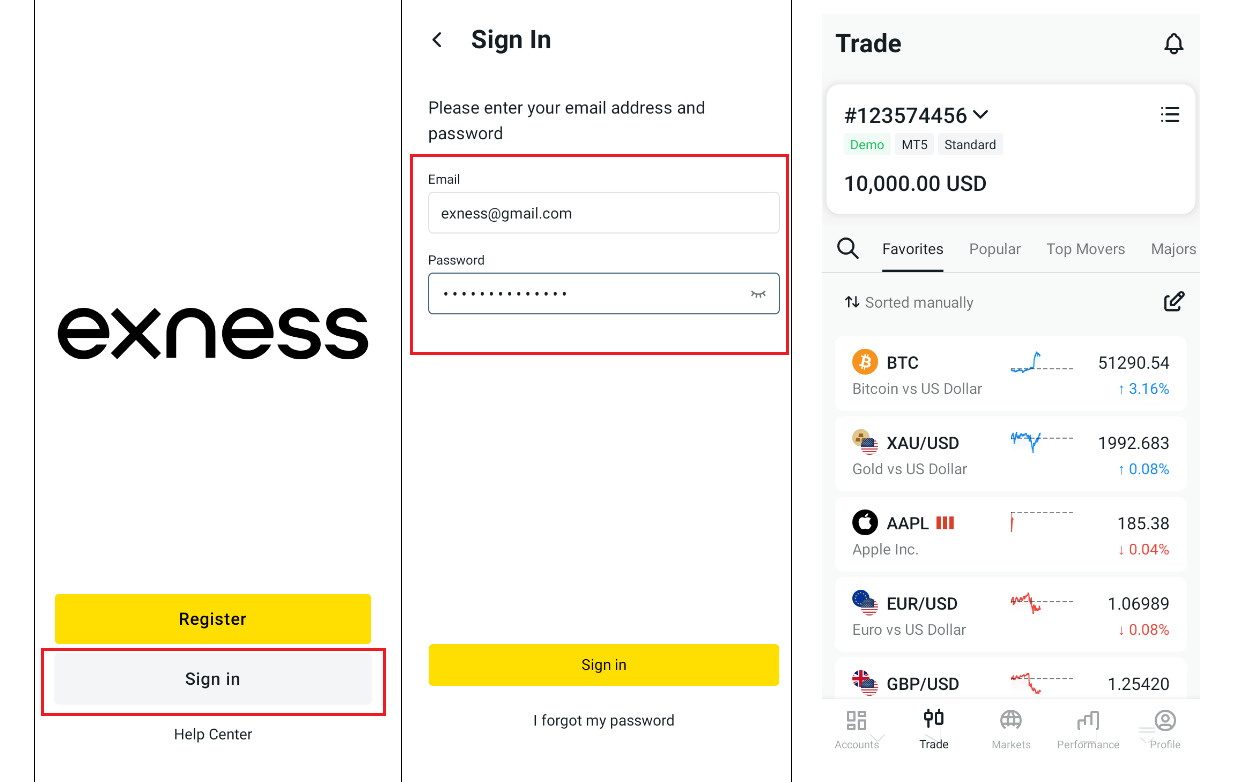
Unlock the convenience of mobile trading with Exness, where the robust functionalities of the desktop platform are mirrored on your smartphone. Access your practice account effortlessly on your mobile:
- Get the mobile trading application directly from the official site using the
- link provided below.
- Launch the app and opt for sign In.
- Input your account details as given at sign-up.
Characteristics of Demo Account
Demo account Exness accurately simulates live market conditions across various platforms.
Accessible Assets
Each trader has access to a wide range of tradable instruments:
Practice trading across these global markets just like with a live trading account.
- Major, minor, and exotic pairs.
- Gold, silver, oil, natural gas.
- Leading company shares.
- Major global indices.
- Top digital.
Practice trading across these global markets just like with a live trading account.
Order Types
All key order types are available on demo account Exness:
Use orders in demo trading just as you would in live markets.
- Market Orders - Instant order execution at current market prices.
- Limit Orders - Pending orders placed at predefined price levels.
- Stop Loss and Take Profit - Risk management orders to exit trades.
Use orders in demo trading just as you would in live markets.
Charting and Analytical Tools
Robust charting capabilities support comprehensive technical analysis:
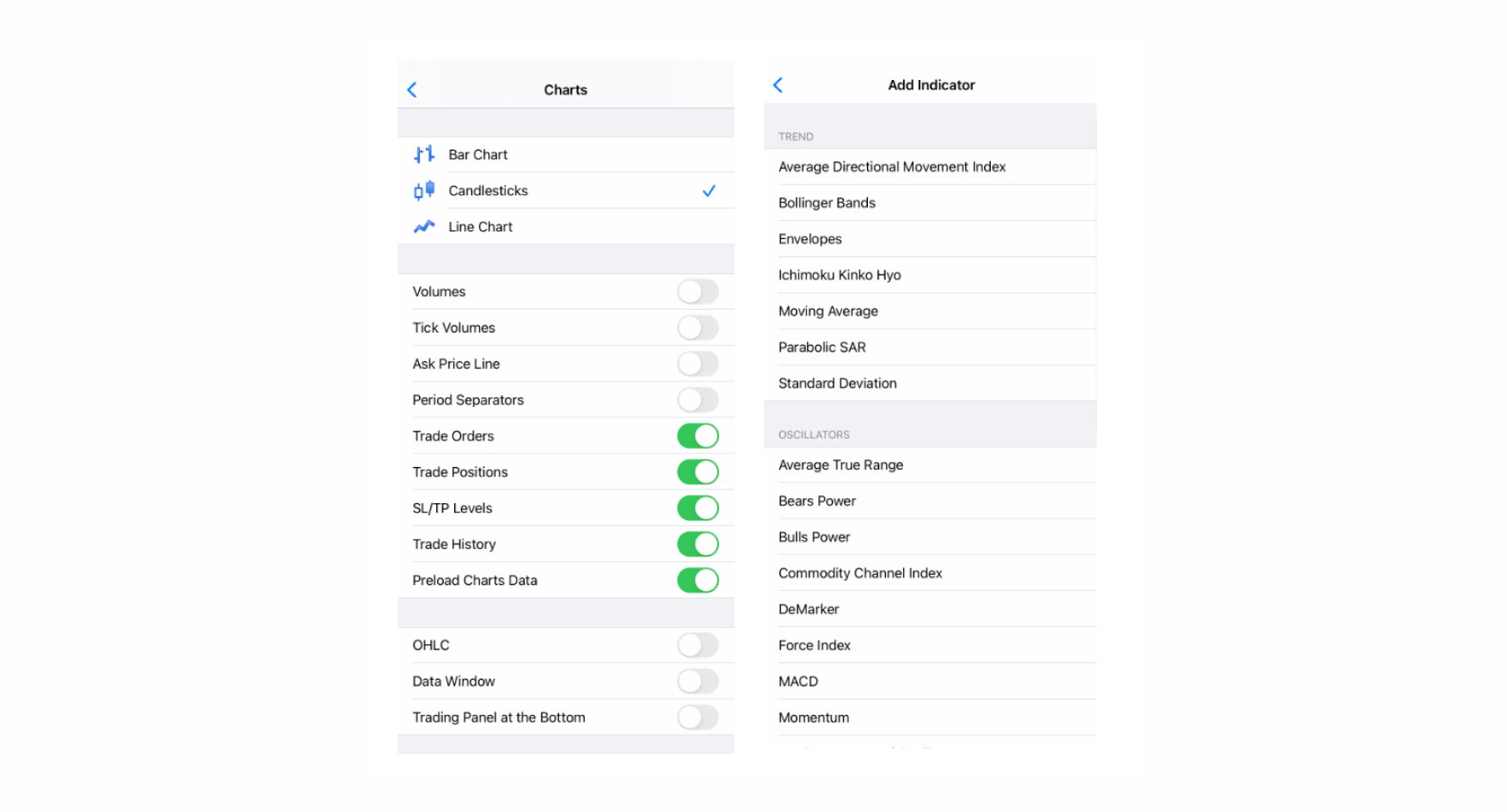
- Flexible chart types - Candlestick, bar, line charts across multiple timeframes from tick data to monthly.
- Indicators - Moving averages, MACD, RSI, Bollinger Bands, Alligator, Fractals, Average True Range, Stochastic and others.
- Drawing tools - Trendlines, channels, Fibonacci retracements, shapes, text annotations.
- Multiple chart synchronization and templating for efficient analysis.
Refilling Account Balances
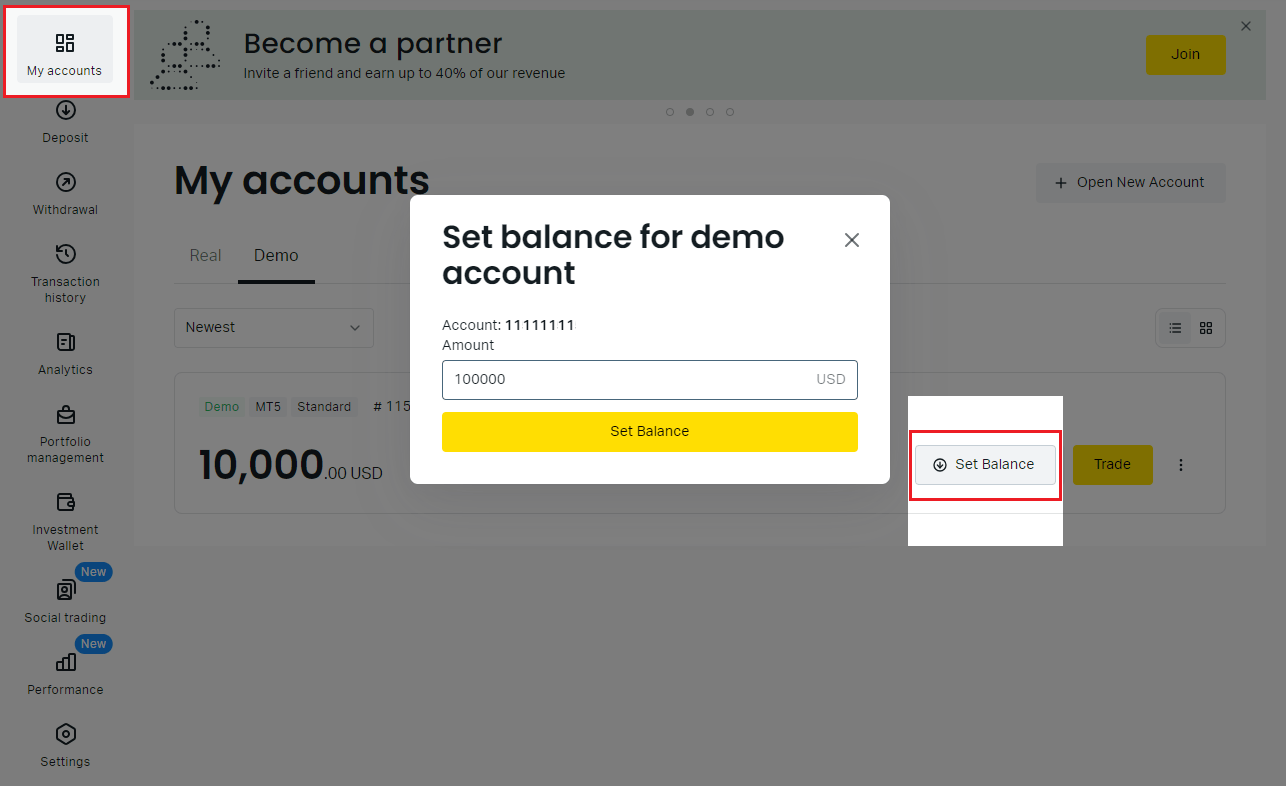
The virtual balance may decrease during trading. You can easily replenishing practice account funds:
Periodically refilling restarts your balance to continue honing skills.
- Log into your WebTrader dashboard.
- Click your profile picture and menu “My accounts”.
- Select the needed Account and click “Set Up Balance” .
- Enter the desired balance amount.
Periodically refilling restarts your balance to continue honing skills.
Tips for demo account
Trial accounts offer a superb chance to enhance trading abilities without the danger of depleting actual money. Yet, to maximize your trading journey, several beneficial recommendations should be considered:
This approach will help you apply the knowledge gained in the trial for successful trading with real money.
- Take it seriously - make decisions as if you were trading real money. Irresponsible trial trading will not bring benefits.
- Set specific goals - focus on practicing risk management, using indicators and other skills.
- Analyze results - keep a trading journal and identify strengths and weaknesses.
- Realistic balance - Inflated trial balances create poor trading habits. It's best to start with an amount that is realistic for your trading capital.
- Move to real trading - slowly apply the skills you worked on in the demo on a real account.
This approach will help you apply the knowledge gained in the trial for successful trading with real money.
Advantages and Disadvantages
Exness provides excellent opportunities for gaining proficiency. Those accounts provide valuable benefits but also
some limitations to consider:
some limitations to consider:
Key Advantages:
Disadvantages:
So new and experienced traders alike can leverage these accounts from a leading broker to learn the ropes and expand abilities. Approach trial trading as an integral component of your ongoing education.
Overall, used conscientiously, Exness demo accounts provide an invaluable educational experience to build skills. But traders should maintain realistic expectations about simulated differences from live real-money trading.
- Demo trading with virtual money rather than real money
- Building competence with the trading platforms through hands-on experience
- Access to MetaTrader 4 or MetaTrader 5 suites of tools and features
- Refining skills across markets assets
- Implementing practice diverse trading strategy and order types
- Developing analysis skills and mental discipline
Disadvantages:
- Virtual funds differ from actual trading psychology when real capital is at stake
- Simplified environment may not perfectly replicate live market conditions
- Traders can take unrealistic risks with the large simulated balances
- Does not account for the emotional pressures of real trading
So new and experienced traders alike can leverage these accounts from a leading broker to learn the ropes and expand abilities. Approach trial trading as an integral component of your ongoing education.
Overall, used conscientiously, Exness demo accounts provide an invaluable educational experience to build skills. But traders should maintain realistic expectations about simulated differences from live real-money trading.
FAQ
Does Exness have a demo trading?
Yes, the broker offers free unlimited trial accounts to demo trading on platforms using virtual money. The accounts accurately simulate real market conditions.
How do I use the Exness demo?
Open a free demo on webterminal, MetaTrader desktop, or mobile apps. Then trade just like a real account - analyze charts, place orders, use indicators etc. - but with fake money to build skills.
Is the Exness practice version free?
Yes, it is free. No deposit or payment required. You get access to all features to practice trade.
How do I top up a demo trading account?
If your virtual balance gets low, easily replenish funds on the web or mobile platforms via the "Top Up Balance" option.
Add virtual money as needed to keep trading.
Add virtual money as needed to keep trading.
What can you trade on the Exness broker trial version?
Demo trading provides access to the same assets as real accounts.
Is the Demo version available on all account types?
Demo trading accounts replicate live account types - Standard, Zero, Raw Spread, Pro. Practice is not available on the standard cent account.
Is the Demo available for strategy testing?
Absolutely, demo are ideal for thoroughly backtesting strategies with indicators, EAs, and technical patterns before applying them to real accounts.